cvm Claude Virtualenv Manager
Star on GitHub
Virtual Environments for Claude Code

Isolated, reproducible
environments for
Claude Code.

Isolate configs, credentials, MCP server registrations, and memories per project. Share setups with your team via cvm.yaml without ever leaking tokens or history.

curl -fsSL https://getcvm.com/install.sh | bash
Read the Docs View Source
bash — 80×24
$
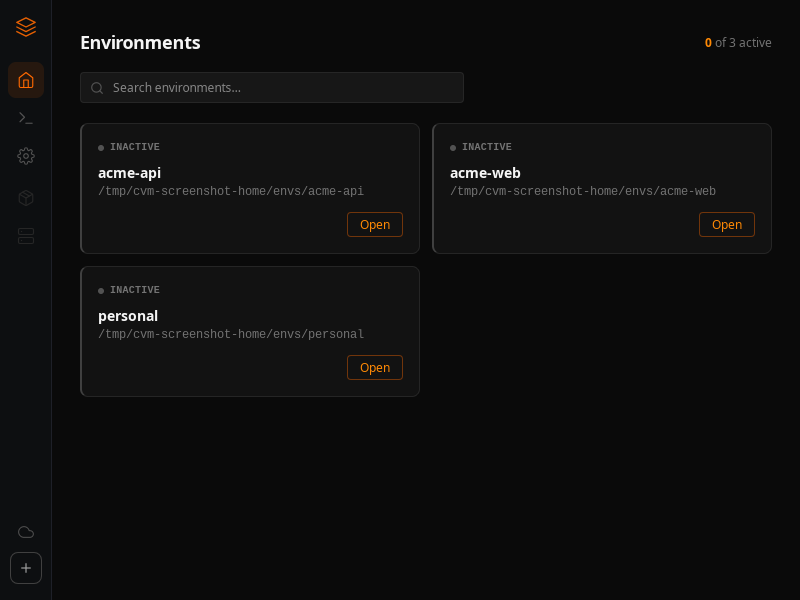
Desktop app

Manage every environment visually

cvm-ui showing the environments list
Core capabilities

Built for real project isolation

Complete Isolation

Separate CLAUDE_CONFIG_DIR per project. Credentials, history, and MCP tools never collide between environments.

Zero Config Drift

Share cvm.yaml manifests across teams to reproduce exact MCP servers and skills in one command.

Safe by Construction

Auth tokens, API credentials, and session history are never exported or included in manifest files.

Parallel Execution

Launch multiple cvm open <env> sessions side by side across client projects without shell interference.

Project Auto-Activate

Drop a .cvm file with an env name in a repo — shell hooks activate it on cd, like a lightweight direnv.

Self-Update

Run cvm update to pull the latest release binary from GitHub and replace the install in place.

Team sharing

Share environments,
never secrets.

Export your full Claude Code setup — MCP server registrations, skills, settings, and env var names — into a portable cvm.yaml. Teammates run cvm import to reproduce the exact environment in seconds.

01
Export your environment
Run cvm export to generate a cvm.yaml manifest in the current directory.
02
Commit to version control
The manifest contains no secrets — safe to commit and share in your repo.
03
Teammates import instantly
Run cvm import to reproduce MCP servers, skills, and settings. Secrets stay local.

Secrets stay local — cvm export shares variable names, never sensitive .env values.

cvm.yaml
Safe to commit
# cvm.yaml — shareable, secrets-free
version: "1"

settings:
  theme: dark
  verbose: false

mcp_servers:
  - name: filesystem
    command: npx
    args: ["-y", "@modelcontextprotocol/server-filesystem"]
  - name: github
    command: npx
    args: ["-y", "@modelcontextprotocol/server-github"]

skills:
  - review
  - aesthetic-stance

env_vars:
  # Variable names only — values never exported
  GITHUB_TOKEN: ""
  OPENAI_API_KEY: ""
CLI Reference

Every command you need

cvm create <env> [--anonymous] [--inherit] [--open]

Create an isolated env at ~/.cvm/envs/<env>; reuse global credentials unless --anonymous; --inherit links skills and copies settings; --open launches Claude Code

Get started

Ship cleaner projects with isolated Claude environments

One install. Zero config drift. Secrets never leave your machine.
Star on GitHub Read the Docs
$ curl -fsSL https://getcvm.com/install.sh | bash